This is default featured slide 1 title

Go to Blogger edit html and find these sentences.Now replace these sentences with your own descriptions.

This is default featured slide 2 title

Go to Blogger edit html and find these sentences.Now replace these sentences with your own descriptions.

This is default featured slide 3 title

Go to Blogger edit html and find these sentences.Now replace these sentences with your own descriptions.

This is default featured slide 4 title

Go to Blogger edit html and find these sentences.Now replace these sentences with your own descriptions.

This is default featured slide 5 title

Go to Blogger edit html and find these sentences.Now replace these sentences with your own descriptions.

Showing posts with label Digital literacy. Show all posts

Sunday, 26 October 2014

Digital Footprint - Advice from the Experts at Tech Forum NY #TLTF14

If students want to run for office, run a business, or change how things are run where they live, work, or play, they need to be savvy users of social media. This starts with having a positive online reputation. I had the opportunity at Tech Forum New York to speak with four Innovative educators (see below for faces and end of article for names) from elementary, middle, and high school as well as a district administrator about how to best prepare students.  

Below is their advice.  


How can you ensure your students are well Googled by the time they graduate?
I want more »
Sunday, 18 May 2014

Learn to teach web literacy with free classes from Mozilla Firefox

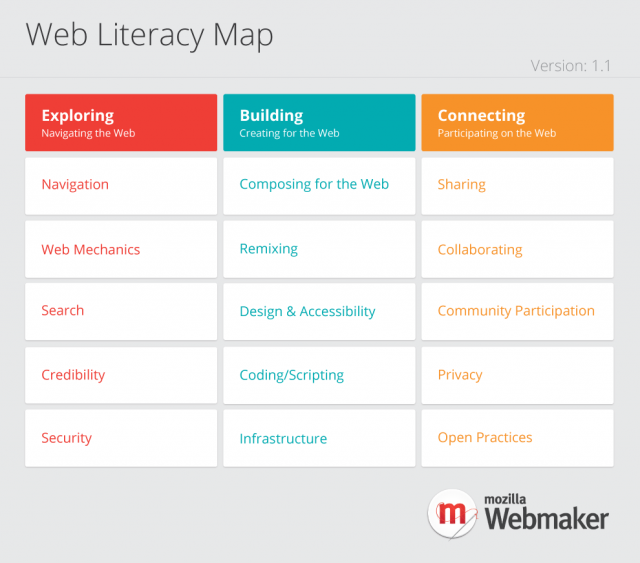
Mozilla, the non-profit that created Firefox, has created tools and resources to educate and empower people to understand the architecture, culture and citizenship of the web. The effort stems from a framework of skills and competencies–known as the web literacy map that addresses everything from basic web navigation and writing code to understanding the consequences of sharing data online and collaborating with others. You can see the map below.
Mozilla Web Literacy Map competency grid
Visit the map at https://wiki.mozilla.org/Learning/WebLiteracyStandard 
I want more »

Sunday, 24 November 2013

Help for parents who want to keep their children safe online

Digital Citizenship Flashcard DeckMore than ninety percent of parents think they should have a lot of responsibility for ensuring their children are safe on the internet, but only one-third think they are prepared to do so. About three quarters of parents think a major portion of the responsibility for ensuring children’s safety on the Internet falls to schools (source: Research on parent attitudes toward internet use PR Newswire (http://s.tt/1z93n). Unfortunately, schools can not and should not be required to be solely responsible for ensuring students safety. In fact, in cities like New York, their internet use and safety policy says that when it comes to online use, “Parents are primarily responsible for transmitting their particular set of family values to their children, and discussing with their children what material is and is not acceptable for their children to access through the Department’s Internet Systems.”  Despite parents knowing this should be their responsibility, the fact is most parents don’t feel prepared and many school systems are telling parents this is indeed their responsibility.  As passionate educators and involved parents know, the answer is in developing trusting relationships and having honest conversations.  However, this knowledge alone does not help an unsure parent know where to begin nor does it help educators in helping parents.  
I want more »

Friday, 1 November 2013

Think before you send or post

This poster from Edutopia provides a simple acronym to guide innovative educators, their students, and families in both online and face-to-face conversations.     


Here are some more resources from Edutopia for teaching digital citizenship http://bit.ly/17vs59G.