This is default featured slide 1 title

Go to Blogger edit html and find these sentences.Now replace these sentences with your own descriptions.

This is default featured slide 2 title

Go to Blogger edit html and find these sentences.Now replace these sentences with your own descriptions.

This is default featured slide 3 title

Go to Blogger edit html and find these sentences.Now replace these sentences with your own descriptions.

This is default featured slide 4 title

Go to Blogger edit html and find these sentences.Now replace these sentences with your own descriptions.

This is default featured slide 5 title

Go to Blogger edit html and find these sentences.Now replace these sentences with your own descriptions.

Showing posts with label Parents. Show all posts

Sunday, 10 November 2013

5 ideas to strengthen the home-school connection in the 1:1 classroom

This article originally appeared at Partners in Learning - 1:1 Hot Topics

Family involvement is important to student success in every classroom. In 1:1 classrooms, the traditional note home in the backpack can be replaced with new methods allowing innovative educators to access a whole new set of tools that can strengthen the home-school connection. If you’re still connecting with parents the way you always have, here are some ideas to update your practice.

1) Open Access  
  • Make sure you provide time for parents to access computers and the internet at your school. There are plenty of computers and they’re not always in use. Be creative. Work with the school’s PTA and provide access for parents who need it.

2) Student-led parent workshops 
  • Your students are learning some awesome new things in a 1-to-1 environment. Have them share with parents via student-led workshops showcasing their work.
3) Livestream
  • Invite parents into your child’s classroom via livestreaming using services like Google Hangout, UStream, and Livestream. Maybe a parent can help with a lesson or just watch some student presentations. Maybe you have parent volunteers work as tutors at certain times via livestream and set up a virtual tutoring station.
4) Facebook 
  • Start a Facebook group or page to give parents a window into their child’s classroom. Have students do the updates. Not only is this a great way for parents to stay in the loop about what is going on, it also gives students a chance to publish for a real audience. See how Ms. Schoening did this with her first-grade class here.
5) Twitter
  • Give parents a live ticker into what is happening in class via Twitter which can be embedded in any online space like a website, blog, or wiki or delivered right to their phone using Twitter Fast Follow.

    See how educators are using Twitter Fast Follow to stay connected with families here.
These are just some ideas for getting parents involved in their child’s education. Which of these ideas would you consider trying? Do you have some ideas that are not listed here? If so, please share.

Wednesday, 14 August 2013

Get back-to-school by engaging families right from their cell phones

The start of the school year is the perfect time to start connecting with parents and families. When families come in to enroll their children, here are some numbers you can give them to stay connected, have a voice, and have some fun all year long.


Anyone (in the U.S.) can receive tweets on their phone even if they haven’t signed up for Twitter. This is a simple way for people to get information they care about in real time. For example, let’s say you want to get tweets from New York City Schools (@NYCSchools). Just text ‘follow NYCSchools’ to 40404. It doesn’t have to stop with following your school district. Schools, principals and even teachers can set up Twitter accounts to keep parents connected to the latest information. Locke Elementary School in Chicago uses it to great effect.


For schools with multi-lingual populations you can set up language-specific accounts.


Help families keep themselves and their students sharp all year long with @QuizU. This  app sends quiz questions to phones for free. Users submit the answer. They will find out if they are correct or incorrect instantly by having the correct answer sent to their phone. Scores are tracked and there are prizes for those who answer 500 correct questions.  
Just text 898932 with any of the following messages:
@quizu.history for History
@quizu.geo for Geography
@quizu.gs for GeneralScience
@quizu.current for current affairs quiz
I want more »

Sunday, 21 July 2013

Stay connected to parents with Google Voice

Contact is key. Our constituencies want us to be accessible. However, 24/7 access isn’t always possible, nor should it be. Chris Casal, the technology teacher & tech coordinator at PS 10 in Park Slope, Brooklyn, uses his Google Voice number on a daily basis to keep the parent-teacher line of communication open & accessible as well as a point of contact available to all members of the PS 10 community.

Google Voice (GVoice) is a free service through Google. If you are a Google Apps school or just have a GMail account, you can get a GVoice phone number by visiting https://www.google.com/voice/?setup=1#setup. If you don’t have a GMail account you can create one for free at www.gmail.com.

Here’s how it works. Google Voice lets you select a standard phone number to tie to your email account. You can have that GVoice number call multiple phones, or none. In addition, the calls & voicemails can be forwarded to your GMail inbox, an app on your smartphone or tablet, and you can reply via those methods too. GVoice takes the actual phone out of the equation and makes the concept of the phone number accessible across all modern technology platforms.

How can this be useful in connecting and coordinating with parents?

I want more »

Sunday, 2 June 2013

How connected is your school? Take this quiz to find out.

In our Web 2.0 world, schools can communicate, connect, interact and engage like never before.  As we leave 2013 behind and move into the 2014 school year it is time to think about how we will replace the one-way communication of the backpack note home with a truly interactive and connected experience for the school community.   This quiz will help you take a look at where you are so you can think about where you want to go. Digital interaction helps us break down barriers, bring communities together, and develop and improve the critical relationships we want to cultivate within our school communities.  
I want more »

Thursday, 9 May 2013

Pinterest curated into Joyce Epstein's 6 Types of #Parent Involvement

If you are responsible for helping to build and strengthen the home-school connection, you’ll want to follow Principal Joe Mazza on Pinterest. Mazza uses Pinterest to pin resources aligned to the National Standards for Parent/Family Involvement Programs which build upon the six types of parent involvement identified by Joyce L. Epstein, Ph.D., of the Center on School, Family, and Community Partnerships at Johns Hopkins University.  

Below you will find the standards for the six types of parent involvement with Pinterest boards that are aligned to each.

Standard I: Communicating
Communication between home and school is regular, two-way, and meaningful.
Follow this board at http://pinterest.com/LeadLearner/communication/
I want more »

Sunday, 5 May 2013

3 ways to use Twitter Fast Follow to strengthen the home-school connection


Did you know that anyone (in the US) can receive Tweets on their phone even if they haven’t signed up for Twitter? Twitter Fast Follow allows anyone to follow Tweets right from any phone with texting capabilities. For a school community, this can provide a simple way for people to get information they care about in real-time. It is a terrific way to build and strengthen the home-school connection.


Here are some ways it can be used.

I want more »

Friday, 12 April 2013

Educators connect with students & parents using Voki animated avatar

With Voki (www.Voki.com) you can share a message using an animated avatar that talks. It is created using a student’s own voice recorded right from any phone. You can design the avatar’s appearance, add voice, and can get an embed code to pop it into any web2.0 compatible site (Wikis, Blogs, Facebook, Websites) or even powerpoint. The avatar moves and speaks based on what the caller says.

Not only does Voki provide a fun way to share information with parents but you can also capture anyone’s message with a cell phone. This means once you set up the Voki up on any computer you can hand phone to a student, teacher, principal or yourself to capture a powerful words and ideas to share.


Who's doing this?

  1. Greg Miller - Primary school principal Since Vokis are easily embeddable school staff often use Voki to record introduction messages for their school websites. For example, special education teacher Kim Gill embedded a Voki to welcome students and parents to their home page (http://teachers.wrdsb.ca/gillk). Primary school Principal Greg Miller recorded a personalized welcome message and embedded onto the school website.
I want more »

Monday, 1 April 2013

Want to strengthen family & community engagement in your #school? Try a flashmob!

Looking for a way to strengthen the family and community engagement at your school? Take a page from the book of PS 10 in Brooklyn, New York.  At a Citywide professional development event where I was discussing using social media to connect and coordinate with families, Parent Coordinator Madeline Seide shared with me the amazing success her school had.


Parent Kristi Spessard, who has a background in choreography worked with families and school staff to organize a huge flashmob on the school playground early one morning as students were lining up for class.  The event was video taped by several members of the school community including Joshua Berger, Benton Collins, John Hennegan, Daniel Koehler, and Mark Rattelle then edited by Benton Collins.


From there the social media fest began!
I want more »

Sunday, 17 March 2013

3 innovative ways to connect with parents via talking on a cell phone


This piece was originally posted in SmartBlog on Education.

We all know we can use cell phone to make calls, but few realize all the innovative ways simple phone calling technology can help us in building the home-school connection.  If you know how to pick up a phone and dial, then it’s time to pick it up a notch and learn about some free and easy to use resources that will help you coordinate and connect with parents in powerful and exciting ways.  

1) iPadio
Wouldn’t it be great to have a weekly podcast for parents?  While the idea sounds good, when we think of podcasting it often seems confusing and hard to put together. Not so with a phonecasting service like iPadio. All you need to know how to do is dial a phone number and speak. Then boom! Your phonecast is instantly published and can be shared via your website, blog, email, or text.  


I want more »

Wednesday, 13 March 2013

7 ways to connect with parents via texting


An abridged version of this article was originally posted in SmartBlog on Education.

Building the home-school connection is important for all school staff, but few realize the power of the tool in their pocket. Even if they don’t have internet access, most parents have access to cell phones. However, in many cases, most simply use their phone as a calling and texting device. It’s time to change that! There is so much more you can do with free and easy to use resources that will help you coordinate and connect with parents in powerful and exciting ways.  


1) LocaModa

LocaModa enables you to connect with parents using the same technology that is viewed by thousands at large-scale events such as concerts, gallery openings, fundraisers, inauguration events, and political conventions. LocaModa allows you to set up your board so you can reach out to parents and their responses are published real time to screens anywhere on any screen via texting or Twitter hashtags.  Go here to learn about getting a free school account.

I want more »

Wednesday, 20 February 2013

Five ways to connect with parents using Poll Everywhere


Poll Everywhere provides a terrific way to capture the thoughts, ideas, and opinions of parents. Simply set up a multiple choice or free response poll, text parents the code, and have them text in their answers like they do on shows like American Idol.

Poll Everywhere provides a quick and easy way to give parents a voice and a vote.  Some ideas for using it include the following.

  • 1) Back-to-School engagement
  • Eric Sheninger, principal of New Milford High School in New Jersey suggests using Poll Everywhere during back to school nights. He says it’s a great way to elicit feedback during budget presentations, or to secure real-time input on school initiatives.
  • 2) QuizzesLaura Spencer, an instructional technology coordinator for a K-8 school district in San Diego suggests using Poll Everywhere to 'quiz' parents on topics taught in school. Students enjoy comparing their responses to their parents.
I want more »

Friday, 15 February 2013

Strengthen the home-school connection right from your phone with Cel.ly


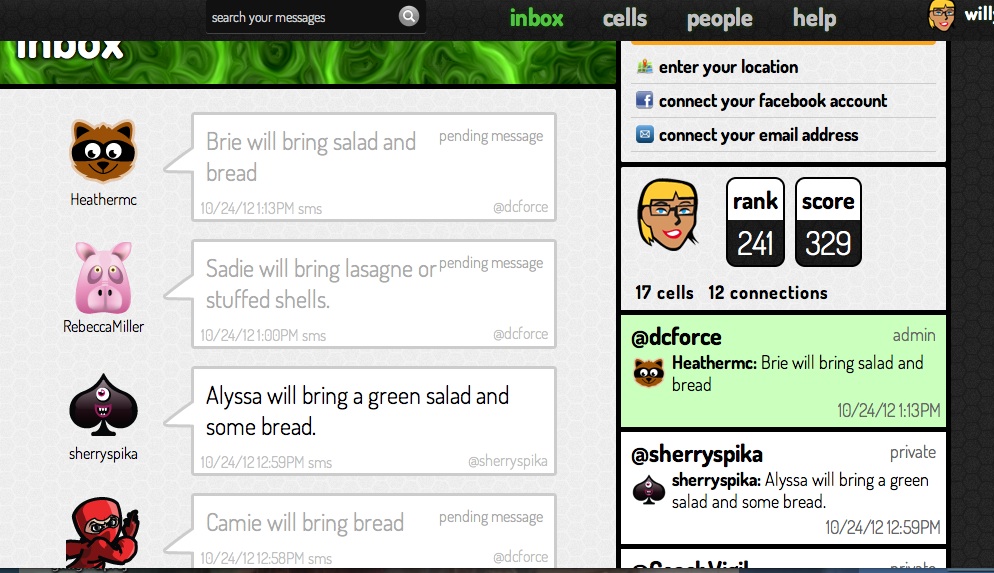
School guidance counselor Willyn Webb says that Cel.ly has made a positive improvement for her school’s Parent Accountability Committee (PAC) which meets once per month.

Celly is a free, mobile social network that works via group texting.  It is instant, private, and secure. There is never an exchange of personal cell phone numbers, yet everyone is connected in the ways that work best depending on the need.  
I want more »

Sunday, 3 February 2013

8 ways to use social media to connect and coordinate with parents

Social media can be a powerful tool to coordinate and connect with parents.  At the school level, this is important work for everyone, from the classroom teacher to the principal. Some districts even have paid school employees called parent coordinators who are responsible for engaging with and involving parents in the school community. It is their job to create a welcoming environment for parents as well as to identify and address parent and related school/community issues.

While many of us are familiar with traditional notes home in the backpack, flyers, and newsletters, social media takes our ability to create, maintain, and grow connections with parents to a whole new level.

Here are some ideas that explain how.

1) Facebook

Parent Coordinator Sara Cottone of P.S. 46 in Staten Island, N.Y., welcomes parents to “like” the Facebook page she created for them. Most recently, the page was a terrific vehicle for sharing planning and logistics information as it pertained to the bus strike. Earlier this year it was a godsend as one of the few ways parents could communicate during Superstorm Sandy. The page is also used to update parents on trips, school performances and other events like picture day. The page is interactive, too. Parents can use the page to comment, ask questions and find out information. Cottone and other parents are always on hand to respond and provide feedback.

For more information visit:  Parent Guide to Facebook.

I want more »

Sunday, 27 January 2013

7 ways to support your child in being digitally responsible without contracts


Parents and educators agree that in the age of “Generation Text” it is important to be prepared to help children become responsible citizens of the digital world. What they don't agree on is how to go about this. While some flocked to follow the advice of the overbearing mom whose iPhone gift came with contractual strings, other parents, educators, and teens alike were appalled by the disrespect and contempt conveyed by such an approach. Ensuring our children are safe and responsible online does not require heavy-handed, authoritarian rules to be forced upon them. Instead, being involved in your child’s digital world can be fun. It can also help you and your child develop an open an honest relationship that will help you to grow closer rather than causing a wedge.  
Here are ideas to get you started on peacefully being supportive of children in their online lives.

I want more »

Tuesday, 27 November 2012

The Plight of the Parent Education Advocate

Guest post by David Bernstein

I’m relatively new to the battle for wholesale educational change, but have fast learned that fighting for a different school model while parenting kids who go to fairly traditional schools requires a tortuous mental balancing act. On the one hand, I’m agitating for change to a badly broken education system, and on the other, I’ve  got to make sure that my own alternative-learning-style kids come out of the school system in one piece.
I love the movie The Matrix, not because it’s such a fabulous piece of art, but because of its powerful message of fighting back against a dehumanizing system that few fully understand.  The film depicts a future in which reality as perceived by most humans is actually a computer simulation meant to subdue the human population, while their bodies are used as an energy source (a little like factory schools producing kids to fuel an industrial economy that no longer exists). Once the main character, Neo, becomes aware of this manufactured reality, he joins a rebellion against the computers. Neo is constantly forced to move in and out of The Matrix in order to challenge it.
Scene from The Matrix
 
Such is the plight of the parent education advocate, fighting the education matrix from without one moment and engaging it from within the next; making sure our children get their work done one moment, and fighting to make sure the schools bend to their and other children’s needs the next.
I want more »

Tuesday, 23 October 2012

Parents consider the value of Twitter during the presidential #debates

Moms Party and Random Court Photos 023.jpg
Editor's note: Social media has changed how many innovative educators have watched important current events such as the presidential debates. What about their parents?


Guest post by Jennifer Bond @teambond

As I watched the Presidential Debate at my parent’s house with my iPad as a companion I opened up TweetCaster and started reading the tweets from my personal learning network (PLN) as well as from those tweeting with the hashtag #debate.  

As the debate began I shared some Tweets with my parents who acknowledged them but didn’t really say much.  As the debate progressed I shared some more tweets. My mom seemed intrigued and took my iPad.  She read through the feed and was excited to find a commonality with my Tweeps sharing, “I said that same thing a couple minutes ago!”  “Yes mom,” I replied. “Twitter allows you to validate your thoughts.”
I want more »